Keyboard and touchpad locking tool for Macs
Kleanly is a premium utility application from indie developer Haider Nawaz. It’s a unique cleaning companion app that enables users to lock the keyboard and touchpad inputs on their MacBooks, so they won't accidentally press or click anything. It can be set up to work individually or both at the same time.
Uninterrupted cleaning
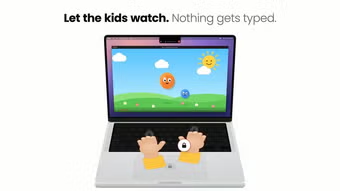
In a nutshell, Kleanly addresses a simple yet inconvenient challenge when cleaning your laptop: accidental keyboard presses and touchpad swipes. The solution is a quick-access toggle beside your display notch or menu bar tab that you can trigger to disable them. It can display a black full-screen overlay that makes it easier to spot dirt and particles while cleaning.
Alternatively, you can have a video playing in the background and watch something if you want a little entertainment. Once you’re done, you can double-tap your touchpad to enable your keyboard and touchpad again. Unfortunately, there is no free trial version available for newcomers to check out first before deciding on a purchase.
Surprisingly useful
To wrap up, Kleanly is one of those apps that will only make sense once you start using it for yourself. It tries to solve a very common yet bothersome problem and succeeds. It’s easy to set up and use, and it works with or without a display notch. If you don’t mind paying upfront, give this one a try.